Keep the same AI character across images
Consistent character AI in practice: a character sheet, one approved anchor image and a change-one-thing workflow to keep the same face across poses and scenes.
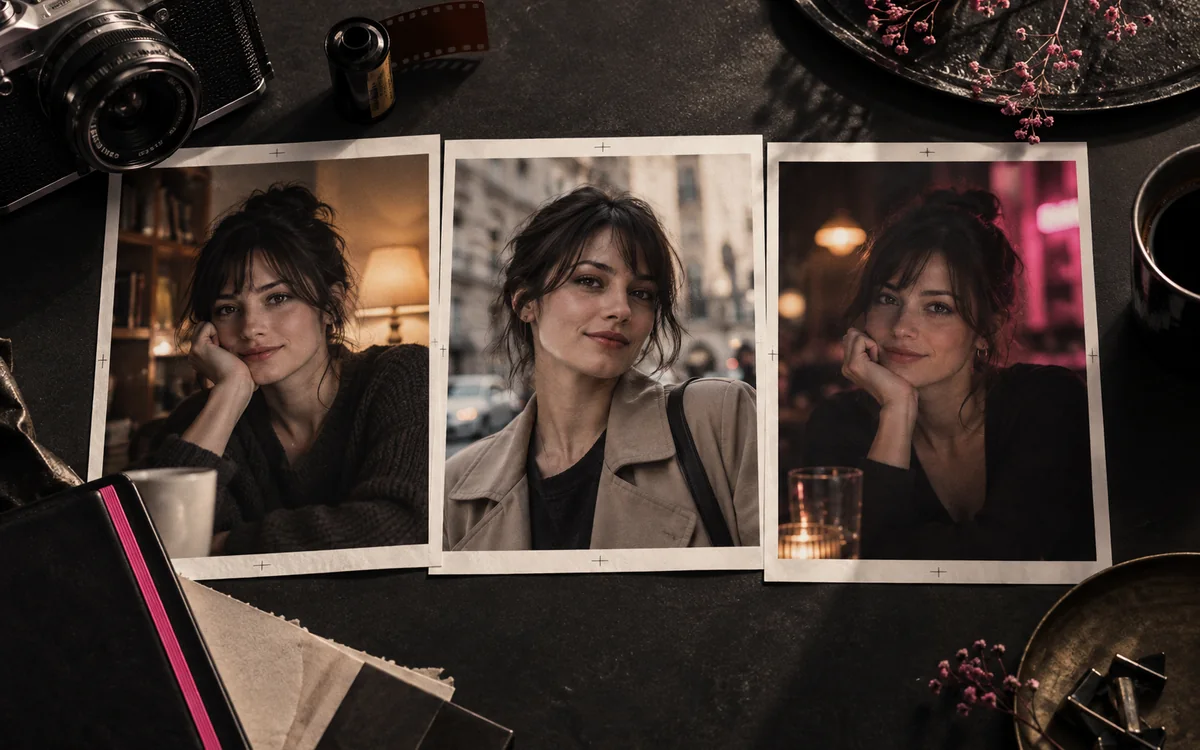
One good portrait is easy to recognize. The hard part is making the next picture look like the same person when the pose, light and setting change. Consistent character AI is a small production workflow, not a magic phrase in the prompt.
Begin with a strong source image and the AI porn prompt guide. This guide focuses on what to keep fixed after that first image works.
Write a short character sheet
Record the stable details you could point to in a picture: approximate adult age, face shape, hair, eye colour and one or two distinctive marks. Keep the wording the same between generations. Save the model, style, aspect ratio and any seed or reference setting the service exposes. A character name alone will not tell an image model what face to reproduce.
For example: "Fictional woman in her thirties, short auburn curls, square jaw, freckles across the nose, dark brown eyes." Put scene details in a separate sentence. If you change both the face description and the setting at once, you will not know which change caused the drift.
- Age
- Fictional woman in her thirties
- Hair
- Short auburn curls
- Face
- Square jaw
- Mark
- Freckles across the nose
- Eyes
- Dark brown
- Settings
- Same model, style, aspect ratio and seed
Choose one approved image as the anchor
Save the first result you like and its prompt. Make the next image as a variation or edit of that result when the service supports it. Promptchan's generator guide describes cloning and remixing a creation, plus pose and composition controls. Its Tweak tool is for focused changes to an existing result. The Promptchan listing also summarizes its image workflow.
Reference controls differ between services. Some accept a saved character, some use an image as a starting point, and some only reuse text settings. Check whether the exact model and plan you chose support the method before buying credits. Do not assume an image-to-video feature also provides a strong still-image character lock.
On companion apps the service holds the character for you, and some manage it better than others. Our listings note faces that stay consistent from picture to picture on Candy AI, MyLovely AI, Dream Companion and AIMOUR. Check it with three or four requests before you rely on it.
Change one dimension at a time
Hold the face and framing steady and change one thing per round, in this order:
- BackgroundChange only the setting. Keep the face, framing and light.
- OutfitOnce the new scene holds, change the clothes.
- PoseLast, because profiles and dramatic light make faces harder to compare.
- Contact sheetPut three or four results side by side. Check eye spacing, nose, jaw, hairline and any distinctive mark.
| If this drifts | Try this next |
|---|---|
| Face | Return to the approved image or stronger reference; keep the face description unchanged |
| Hair or outfit | Edit that region rather than regenerating the whole frame |
| Body proportions | Use a simpler pose and consistent framing |
| Art style | Keep the same model and style settings until the character is stable |
Do not judge consistency from a tiny preview. Open the downloaded images side by side. A character can look similar at thumbnail size and noticeably different at full resolution.
Keep a version you can repeat
Store the source image, prompt, model settings and your preferred edits together. Note which attempt was successful and which variable changed. That record saves credits when you revisit the character weeks later or move to another tool.
If you want motion, animate the approved still only after its look is settled. The image-to-video guide covers how to direct a simple movement and check whether the character stays recognizable in the downloaded clip. Use fictional adults and reference material you have permission to upload.
Questions people ask
How do I keep the same face in AI images?
Save one approved image as your anchor, reuse the exact same face description, keep the model and style settings fixed, and change only one thing per attempt, starting with the background. Edit the new image from the anchor where the service allows it.
Which AI porn generators are good at consistent characters?
Consistency is AliveAI's headline feature, and Promptchan lets you restyle and remix a character you've made. Check that the model and plan you choose support references or edits before buying credits.
Why does my AI character's face keep changing?
Usually because too much changed at once: a new pose, new light and a new setting together. Generic faces also drift more than faces with a distinctive mark, like freckles or a scar.